

 Tolulope Michael
Applications of Web (2026): Everything You Need to Know
A web application is software that runs entirely in your browser, allowing you to interact with data and services without installing anything on your device.
From online banking to team collaboration, applications of web power modern workflows and digital tools. Understanding these applications helps businesses and individuals leverage technology securely and efficiently.
Web apps operate on a client-server model: your device sends requests to a remote server, which processes the data and returns results instantly. This setup ensures updates, security, and scalability without burdening the user with manual installations.
In this article, you’ll discover:
- What a web application is and how it differs from a website.
- Top web application examples and a full web apps list.
- The advantages and disadvantages of web application usage.
- How to build a web app and modern progressive web application development services.
By the end, you’ll know how web-based applications shape everyday digital experiences and how to safely leverage them in your workflow.
What Is a Web Application and How It Differs from Websites
A web application is a program that lets users perform tasks directly in a web browser. Unlike static websites that display information, web-based applications process inputs, manage data, and respond in real time.
Web apps operate on a client-server architecture. Your browser (the client) sends requests to a remote server, which executes the task and sends back results instantly. This enables features like secure logins, form submissions, and interactive dashboards.
In contrast, a website primarily shares content and information. Websites focus on reading and browsing, while web applications focus on user interaction and functionality. Examples of web apps include online banking platforms, social media networks, and e-commerce stores. Examples of websites include blogs, news portals, or a company’s informational pages.
Cybersecurity note: Web applications require stronger security than websites because they handle sensitive data and user inputs. Implementing authentication, encryption, and secure data storage is essential to prevent unauthorized access and data breaches.
RELATED ARTICLE: What is an Application Client Container?
Types of Web-Based Applications
Web applications come in various application types, each designed to meet specific user needs. Understanding these categories helps businesses choose the right web-based applications while maintaining security and efficiency.
1. Productivity & Collaboration
- Apps like Google Docs, Microsoft 365, and Slack enable teams to create, share, and edit documents in real time.
- Cybersecurity tip: Use two-factor authentication and secure file permissions to protect sensitive work data.
2. E-Commerce
- Platforms like Amazon, Jumia, and Etsy allow users to buy and sell products online.
- Cybersecurity tip: Ensure encrypted payment gateways and secure user authentication.
3. Social Media
- Apps such as Meta, X (formerly Twitter), TikTok connect users through posts, messaging, and multimedia sharing.
- Cybersecurity tip: Protect accounts with strong passwords and monitor for suspicious activity.
4. Finance & Online Banking
- Services like PayPal, Venmo, and online banking portals process payments, transfers, and account management.
- Cybersecurity tip: Enforce multi-factor authentication and monitor transactions for anomalies.
5. Entertainment & Streaming
- Platforms like Netflix and Spotify deliver video and audio content on demand.
- Cybersecurity tip: Implement secure streaming protocols to protect media and user data.
6. Education & Learning
- Web apps such as Coursera, Khan Academy, and Duolingo provide interactive learning experiences.
- Cybersecurity tip: Protect student data and learning progress with secure storage and access control.
7. Content Management Systems (CMS)
- Apps like WordPress, Joomla, and Drupal help businesses manage websites and digital content.
- Cybersecurity tip: Keep plugins and core systems updated to avoid vulnerabilities.
These web-based applications demonstrate the versatility and critical role of web apps in modern digital ecosystems. Each type balances usability with security, enabling safe and scalable interaction for users.
20 Examples of Web Applications You Use Every Day
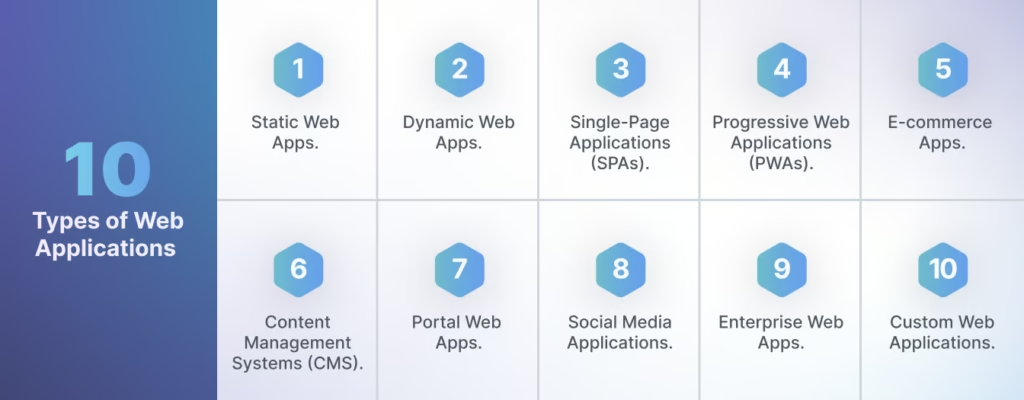
Web applications touch nearly every part of modern life. Here’s a web apps list of popular tools and platforms, along with their cybersecurity considerations:
- Google Docs – Collaborate on documents in real time. Security tip: Enable two-factor authentication.
- Microsoft 365 – Offers email, spreadsheets, and cloud storage. Security tip: Use encrypted file sharing.
- Slack – Teams communicate instantly through channels and messages. Security tip: Monitor third-party app integrations.
- Zoom – Video conferencing for teams and classrooms. Security tip: Enable meeting passwords and waiting rooms.
- Trello – Project management with boards, lists, and cards. Security tip: Limit board access to authorized users.
- Asana – Organize tasks and workflows for teams. Security tip: Review permissions regularly.
- Amazon – E-commerce platform for buying products online. Security tip: Use secure payment gateways.
- Jumia – Popular African e-commerce store. Security tip: Monitor account activity for fraud.
- Etsy – Marketplace for handmade and vintage items. Security tip: Verify seller authenticity.
- PayPal – Online payments and money transfers. Security tip: Always enable two-factor authentication.
- Venmo – Peer-to-peer mobile payments. Security tip: Review privacy settings for transactions.
- Netflix – Streaming platform for movies and series. Security tip: Secure login credentials.
- Spotify – Audio streaming and playlists. Security tip: Use strong passwords and avoid shared accounts.
- Meta (Facebook) – Social networking and messaging. Security tip: Enable account recovery options.
- X (formerly Twitter) – Microblogging platform. Security tip: Protect accounts from phishing links.
- TikTok – Short video content sharing. Security tip: Monitor app permissions on devices.
- Gmail – Webmail for personal and enterprise users. Security tip: Enable phishing protections.
- WordPress – Website and blog management system. Security tip: Keep plugins and themes updated.
- Drupal – Enterprise content management. Security tip: Apply security patches promptly.
- Coursera – Online learning and certification. Security tip: Protect student data with secure storage.
These web application examples illustrate how web-based tools improve productivity, entertainment, learning, and commerce. Each platform requires cybersecurity awareness to maintain safe usage.
READ MORE: IoT Artificial Intelligence: Leveraging AI and IoT for Better Cybersecurity
Advantages of Web Applications
Web applications offer businesses and users numerous benefits that make them essential in today’s digital ecosystem.
- Cross-Platform Accessibility – Users can access web-based applications from any device or browser. This flexibility eliminates the need for separate versions for Windows, macOS, iOS, or Android.
- No Installation Required – Web apps run directly in browsers, so users avoid web apps download hassles. Updates happen automatically on the server, ensuring everyone uses the latest version.
- Cost-Effective Development – Developers can build one version of a web application instead of multiple native apps. This reduces time, effort, and maintenance costs.
- Scalability – Businesses can scale web-based applications to handle growing user bases and data demands without major infrastructure changes.
- Real-Time Collaboration – Tools like Google Docs, Microsoft 365, and Slack allow multiple users to work simultaneously. Collaboration happens securely, improving team productivity.
- Enhanced Security – Developers implement encryption, secure login, and role-based access to protect sensitive data. Properly designed web applications reduce the risk of unauthorized access.
- Easy Integration – Modern web apps connect with APIs, payment systems, and other services, providing seamless functionality across platforms.
- SEO Benefits for PWAs – Progressive web application development services help businesses improve visibility online. PWAs combine the accessibility of web apps with SEO advantages of web pages.
By leveraging these advantages of web application, organizations can improve productivity, user engagement, and security while reducing development and operational costs.
Disadvantages of Web Applications
While web-based applications offer many benefits, they also come with limitations that users and developers must consider.
- Dependence on Internet Connectivity – Web applications require a stable internet connection. Users experience delays or cannot access the app when connectivity is poor or unavailable.
- Performance Limitations – Heavy processing tasks can slow down web apps, especially when large amounts of data are transmitted between the client and server.
- Limited Device Access – Web apps cannot fully use device-specific features like cameras, GPS, or sensors. Native apps provide deeper hardware integration, which web-based applications cannot always match.
- Security Risks – Web applications handle sensitive user data, making them targets for hacking and phishing. Developers must implement encryption, secure authentication, and regular patching to reduce vulnerabilities.
- User Experience Constraints – Some web apps may feel less responsive or visually rich compared to native applications. Performance depends on the browser and device capabilities.
- Offline Functionality – Most web apps do not operate offline. Users must rely on online access, though progressive web apps (PWAs) can mitigate this limitation.
By understanding the advantages and disadvantages of web application usage, organizations can make informed decisions about deployment, security measures, and platform choices.
How to Build a Web App

Building a web application requires careful planning, development, and security measures. Following structured steps ensures a robust, scalable, and secure web-based application.
- Define Purpose and Requirements – Identify the application type, target users, and key features. Clear goals guide development and improve user experience.
- Choose a Technology Stack – Select frontend and backend frameworks. Common choices include HTML, CSS, and JavaScript for the client side, and Python, Node.js, or PHP for the server side. For PWAs, implement progressive web application development services to enable offline access and push notifications.
- Design the User Interface (UI) – Create intuitive layouts and interactive elements. Use responsive design so the web app works seamlessly on desktops, tablets, and smartphones.
- Develop the Backend – Set up servers, databases, and APIs to process user requests efficiently. Implement authentication, encryption, and role-based access to protect sensitive data.
- Integrate Security Measures – Secure the app from common threats such as XSS, SQL injection, and phishing. Regularly update dependencies and monitor logs for suspicious activity.
- Test Thoroughly – Conduct functional, usability, and security tests. Testing ensures the web app operates reliably and safeguards user data.
- Deploy and Maintain – Launch the app on a secure server. Continuously monitor performance, apply updates, and maintain scalability as users and data grow.
By following these steps, developers can create secure and efficient web apps that deliver a seamless experience while maintaining high cybersecurity standards.
SEE ALSO: What Is a Checksum? Everything You Need to Know in 2026
Progressive Web Apps (PWAs) and Modern Development
Progressive Web Apps (the PWA) combine the accessibility of web apps with the experience of native mobile apps. They run in browsers but provide offline functionality, push notifications, and fast load times, making them highly versatile for businesses and users.
PWAs improve PWA SEO by allowing search engines to index content like a standard website while offering app-like experiences. This increases discoverability, user engagement, and conversion potential.
Key benefits of progressive web application development services include:
- Offline Access – Users can continue interacting with the app even without internet connectivity.
- Push Notifications – Businesses can send updates directly to users, boosting retention and engagement.
- Cross-Platform Compatibility – PWAs work on any device and browser, reducing the need for multiple native apps.
- Faster Loading Times – PWAs leverage caching strategies to improve performance and user experience.
- SEO Advantages – Because PWAs are indexable, they can appear in search results, enhancing visibility for web applications.
Cybersecurity Tip: Even though PWAs run in browsers, they must implement secure authentication, HTTPS encryption, and proper data handling to protect sensitive user information.
By integrating PWAs, organizations can maximize both accessibility and security while enhancing their digital footprint.
Web Apps Download and Accessibility

Most web-based applications run directly in a browser, so users do not need to download web apps. This eliminates installation hassles and ensures everyone accesses the latest version immediately.
Web apps work across devices, desktops, laptops, tablets, and smartphones, making them inherently cross-platform. Developers only need to build one version, reducing development time and maintenance costs.
For organizations, this approach simplifies updates and enhances security. Servers host the application centrally, allowing IT teams to implement patches, enforce authentication, and monitor for vulnerabilities without relying on individual devices.
Progressive Web Apps (PWAs) take accessibility further. They allow users to “install” the app on their device home screen without app stores, provide offline access, and still retain full functionality within the browser.
By understanding how web-based applications deliver convenience, businesses can maximize adoption while maintaining secure, scalable operations.
Conclusion
Web applications deliver convenience, scalability, and accessibility across multiple platforms. They allow users to interact with data, collaborate in real time, and access services without installing software. Tools like Google Docs, Amazon, Slack, and PayPal demonstrate the power and versatility of web-based applications.
At the same time, disadvantages of web application usage exist. Web apps rely on stable internet connections, can have limited access to device features, and require ongoing cybersecurity measures to protect sensitive data. Understanding both the advantages and disadvantages of web application usage helps businesses and individuals make informed decisions about deployment, security, and workflow.
By choosing the right application type and applying modern practices such as progressive web application development services, organizations can maximize benefits while minimizing risks. Web applications continue to evolve, offering increasingly sophisticated experiences while maintaining cross-platform functionality and security.
Take what you’ve learned about web apps and cybersecurity further.
Get a personalized roadmap to start your cybersecurity career, even with no experience.
Book your strategy session with Tolulope Michael today.
FAQ
What are web 3 applications?
Web 3 applications, also called decentralized applications (dApps), run on blockchain networks instead of traditional servers. They enable peer-to-peer interactions without intermediaries, providing greater transparency, security, and user control. Examples include Uniswap (decentralized exchange), OpenSea (NFT marketplace), and Decentraland (virtual world platform).
What are the 7 types of application software?
Application software can be categorized into seven main types:
Productivity Software – Word processors, spreadsheets, and presentation tools.
Database Software – Tools for storing and managing structured data.
Media Software – Audio, video, and graphic editing tools.
Enterprise Software – ERP, CRM, and HR management systems.
Educational Software – E-learning platforms and classroom tools.
Web Browsers – Applications that enable internet access and web interaction.
Communication Software – Email, chat, and video conferencing tools.
What is a web 2 application?
A Web 2 application refers to interactive, user-centered websites and apps that allow content creation, social interaction, and collaboration online. Unlike static websites, Web 2 apps rely on databases, user accounts, and dynamic content. Examples include Facebook, YouTube, Twitter, and online marketplaces like Amazon.
Is WhatsApp a web application?
Yes, WhatsApp Web is a web application that mirrors your mobile WhatsApp account in a browser. It allows sending messages, media, and managing chats without installing a separate program on your computer. It still relies on your phone for authentication and syncing.
