

 Tolulope Michael
What Is a Checksum? Everything You Need to Know in 2026
A checksum is a unique, fixed-size value generated from a file or string of data to verify its integrity. It acts like a digital fingerprint: even a single change in the data produces a completely different checksum. By comparing the calculated checksum with the original, you can confirm that the file or message has not been corrupted, altered, or tampered with during transfer, download, or storage.
Checksums play a critical role in networking, software distribution, and data storage, ensuring that the information you rely on remains accurate and intact. Whether you are downloading a large operating system image, transferring sensitive records, or validating log files, using a checksum gives you immediate proof of data integrity.
So let’s go deeper than just answering the question: what is a checksum?
What Is a Checksum in Networking?
In networking, a checksum verifies that data travels across a network without errors. Every packet of information, whether sent via TCP or UDP, includes a checksum calculated by the sender. The receiving device recalculates the checksum for the incoming packet and compares it to the original.
If the two values match, the packet arrives intact. If they differ, the system flags a checksum error, signaling corruption or transmission issues. This process allows networks to detect problems like flipped bits, missing bytes, or altered messages before delivering data to applications.
Checksums in networking are crucial for reliable communication. For example, TCP uses checksums to ensure every byte of a message reaches its destination correctly, while UDP applies checksums selectively to maintain speed. By spotting transmission errors early, checksums prevent corrupted data from disrupting applications, downloads, or real-time services.
RELATED ARTICLE: User Datagram Protocol (UDP): 2026 Update You Need to Know
How Checksums Work

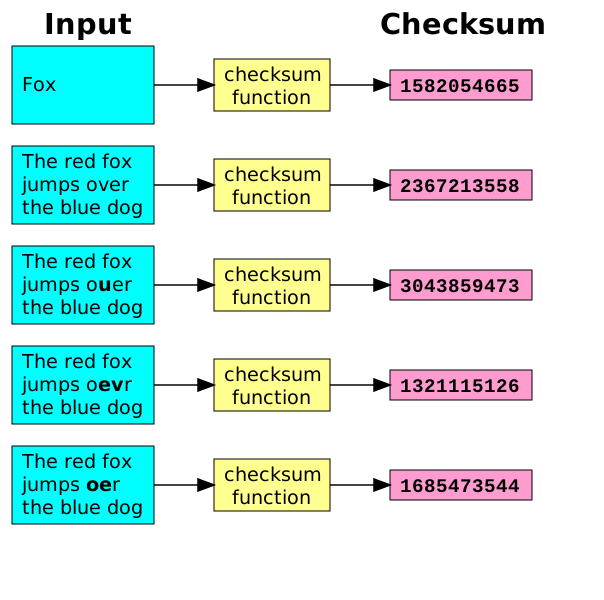
Checksums work by converting data into a unique numerical value using a checksum algorithm. The process ensures that even a single change in a file or message produces a different checksum, making it easy to detect corruption or tampering.
Step 1: Generation – The sender runs the file or message through a checksum algorithm, such as MD5, SHA-1, or SHA-256. The algorithm adds, shifts, or hashes the data to produce a fixed-length value known as the file checksum.
Step 2: Transmission – The original data and its checksum are sent together across the network or saved to storage.
Step 3: Verification – The receiver recalculates the checksum from the received data and compares it to the original. If the two match, the file is intact. If they differ, a checksum error occurs, indicating possible corruption or modification.
Checksum Example:
- Original message: Hello World
- MD5 checksum: b10a8db164e0754105b7a99be72e3fe5
- Changing even one character results in a completely different checksum, immediately revealing the alteration.
By following this method, systems and users can confidently verify file integrity, prevent corrupted data from being used, and maintain secure communication channels.
Types of Checksum Algorithms
Checksums rely on different algorithms, each with unique strengths, weaknesses, and use cases. Understanding these types of checksum helps you select the right one for verifying file integrity.
| Algorithm | Output Size | Security Status (2026) | Use Case / Notes |
| MD5 | 128 bits | Broken / Legacy | Fast for basic corruption checks; not secure against tampering. |
| SHA-1 | 160 bits | Broken / Deprecated | Found in older systems; avoid for security verification. |
| SHA-256 | 256 bits | Secure | Standard for ISO downloads, software verification, and TLS. |
| SHA-512 | 512 bits | Secure | Higher assurance for sensitive files or large datasets. |
How these algorithms differ:
- MD5 and SHA-1 generate checksums quickly but are vulnerable to collisions.
- SHA-256 and SHA-512 are slower but resistant to tampering, making them ideal for Linux ISOs, cloud storage, and critical applications.
- Some older software may not support SHA-512, so SHA-256 remains the practical standard.
By choosing the right checksum algorithm, you minimize the risk of checksum errors and ensure that your data verification is both accurate and reliable.
READ MORE: SAP ERP Companies: 2026 Update
How to Calculate a Checksum
You can calculate a checksum on Linux, Windows, or macOS to verify file integrity. Using a checksum calculator or built-in commands ensures your file is intact and unchanged.
Linux Checksum
- Open Terminal.
- Navigate to the folder containing your file.
- Run a command depending on the algorithm:
- SHA-256: sha256sum filename
- SHA-512: sha512sum filename
- Compare the output to the official checksum. A match confirms the file is valid.
Windows Checksum
- Open PowerShell.
- Navigate to the file location.
- Run: Get-FileHash filename -Algorithm SHA256
- Check the resulting hash against the published value.
macOS Checksum
- Open Terminal.
- Navigate to the file folder.
- Run: shasum -a 256 filename
- Verify the output matches the official checksum.
Manual Example:
- File: example.iso
- SHA-256 checksum: 3a7bd3e2360a1fcd…
- Calculating the checksum locally with one of the above commands should produce the exact same value. If it differs, the file may be corrupted or altered, triggering a checksum error.
Using a checksum checker or these commands lets you calculate the checksum quickly and confirm your downloads, patches, or backups are authentic.
Common Checksum Errors and How to Fix Them
A checksum error occurs when the calculated checksum does not match the original, indicating that a file or data packet has changed. These errors can happen for several reasons:
- Interrupted downloads – network issues can corrupt files.
- Storage problems – bad sectors on hard drives or failing USB drives.
- File corruption – accidental edits, incomplete copies, or malware.
- Transmission interruptions – dropped packets in networking.
How to fix checksum errors:
- Re-download the file from a trusted source.
- Use a checksum calculator to recalculate and verify integrity.
- Check storage media for errors or replace faulty drives.
- Verify the source using signed checksums or GPG signatures when available.
By addressing checksum errors immediately, you prevent corrupted files from causing software issues, failed installations, or compromised data. Regular verification ensures your systems and data remain reliable.
SEE ALSO: Public Key Infrastructure (PKI): How It Works in 2026
Practical Use Cases of Checksums

Checksums provide a reliable way to ensure file integrity and prevent data corruption in everyday scenarios. Here are some practical examples:
- Software Downloads – Verify ISO images, updates, or patches to confirm they match the original publisher’s files.
- Data Storage & Archival – Detect corrupted or altered files on shared drives, cloud storage, or long-term backups.
- Networking – TCP and UDP packets include checksums to detect errors during transmission.
- KYC Verification – Banks and financial institutions use checksums to ensure sensitive customer data remains unaltered.
- Healthcare & Lab Results – Checksums confirm that patient records, lab results, or medical test files have not been modified.
- E-commerce Transactions – Platforms validate orders, invoices, and payment data to prevent discrepancies or tampering.
Across industries, the principle stays the same: checksums give immediate proof that your data is still trustworthy. They help prevent errors, detect tampering, and maintain accountability without slowing down operations.
Conclusion
A checksum is a powerful tool that acts as a digital fingerprint for any file or data. By using a checksum calculator or built-in commands, you can calculate the checksum to verify that files remain unchanged and error-free.
Whether for networking, software downloads, Linux systems, cloud storage, or sensitive records, checksumming ensures data integrity, detects checksum errors, and prevents corrupted or tampered files from causing problems. Regular verification keeps your systems reliable and your data trustworthy.
By understanding what is a checksum and how to use it effectively, you gain confidence that your files, messages, and transmissions maintain their original state, protecting both data and operational workflows.
Protect Your Career, Not Just Your Files
You now know how checksums safeguard data and prevent costly errors. But knowledge alone isn’t enough to secure a future in cybersecurity.
Get hands-on guidance, a clear roadmap, and expert support to break into cybersecurity, even with zero experience.
Schedule your one-on-one strategy session with Tolulope Michael today and take the first step toward a high-paying, secure tech career.
FAQ
What are checksums also known as?
Checksums are sometimes called hash values, hash sums, or digital fingerprints. Each term reflects the same concept: a unique value generated from a file or data string that verifies integrity.
How do you generate a checksum?
To generate a checksum, you run the file or data through a checksum algorithm such as MD5, SHA-1, or SHA-256. The algorithm processes the data and produces a fixed-length value representing the contents. Any change to the data will create a different checksum, signaling a modification or corruption.
What does a checksum file look like?
A checksum file typically contains a list of checksums paired with their corresponding filenames. For example, a SHA-256 checksum file might look like this:
3a7bd3e2360a1fcd1234567890abcdef1234567890abcdef1234567890abcdef example.iso
Each line shows the checksum value first, followed by the file name it verifies. These files are often distributed alongside ISO images or software packages.
Can checksum detect all errors?
No. Checksums cannot detect all types of errors. They catch accidental changes like corrupted bytes or transmission errors, but may miss issues like byte reordering, missing data blocks, or intentional tampering if a sophisticated attacker recalculates the checksum. For higher security, checksums are often paired with cryptographic signatures or stronger hash functions.